

The freelance economy is no longer a side trend — it’s a global movement reshaping how businesses operate. In 2025, over 1.6 billion people worldwide are expected to be part of the gig economy, with freelancing platforms like Upwork, Fiverr, and Freelancer.com connecting talent with businesses at an unprecedented scale.
For entrepreneurs, this represents a massive opportunity. A well-built freelancing website can tap into this growing demand, generate multiple revenue streams, and operate with relatively low overhead compared to traditional businesses.
However, creating a successful freelance marketplace isn’t just about launching a website. It requires careful planning, the right business model, user-focused features, and a robust technical foundation.
In this guide, we’ll walk you through how to start a freelancing website step-by-step, highlight common pitfalls, and explain how Yo!Gigs, our white-label freelance marketplace software, can help you launch faster and more efficiently.
Table of Contents
What is a Freelancing Website?
A freelancing website is an online marketplace where businesses and individuals can hire independent professionals for specific projects or ongoing work. These platforms typically allow:
- Clients to post jobs or projects
- Freelancers to bid or apply for those jobs
- Secure payments through integrated gateways or escrow
- Ratings and reviews to build trust between parties
Examples:
- Upwork: Large-scale global freelancer platform
- Fiverr: Microservices marketplace
- Toptal: Premium network of vetted professionals
Freelancing websites have become vital in bridging the gap between talent and opportunity. With remote work becoming the norm, the demand for such platforms is only growing.
Why Start a Freelancing Website in 2025?
If you’re wondering whether now is the right time — the answer is yes. Here’s why:
# Growing Remote Work Culture
Businesses worldwide are comfortable hiring remotely, making freelancing platforms an essential recruitment tool.
# Low Operational Costs
Compared to brick-and-mortar businesses, you don’t need physical space, a large workforce, or expensive inventory.
# Multiple Revenue Streams
You can monetize through:
- Commission fees
- Subscription plans
- Premium listings
- Advertisements
Want to skip months of development and launch your platform quickly?
Step-by-Step Guide to Starting a Freelancing Website
Starting a freelancing website begins with choosing the right niche and understanding your target audience. You then set up essential features that help freelancers and clients connect smoothly. By following this step-by-step guide, you can start a freelancing website that is scalable and easy to launch.
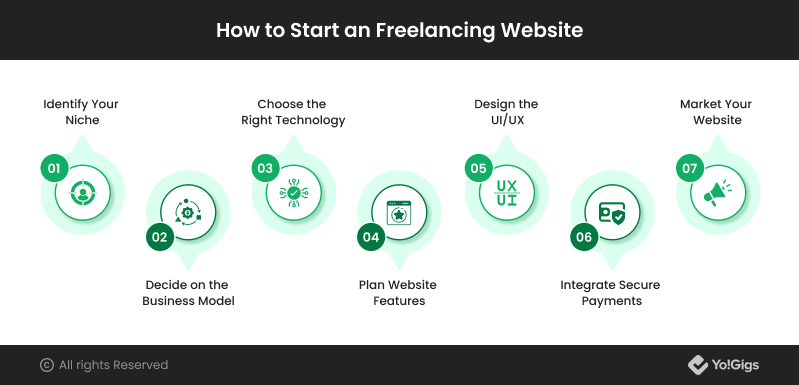
Step 1 – Identify Your Niche
Choosing the right niche can make or break your platform. Broad marketplaces like Upwork have massive competition. Consider targeting:
- Industry-specific niches (e.g., freelance writers, app developers, translators)
- Location-based niches (e.g., freelancers from a particular country or city)
Example: A freelancing website exclusively for legal professionals could cater to law firms needing temporary help.
Step 2 – Decide on the Business Model
Your business model determines how you’ll generate revenue. Common models include:
- Commission-Based: Earn a percentage from every completed transaction.
- Subscription-Based: Charge users (clients, freelancers, or both) a recurring fee for access.
- Hybrid: A mix of subscription and commission.
Pro Tip: Commission-based models are beginner-friendly, but subscription models can offer more predictable revenue.
Step 3 – Choose the Right Technology
You have two main options:
Custom Development:
- Fully tailored but costly and time-consuming.
- Requires a dedicated development team.
White-Label Solution:
- Pre-built, customizable platform that can be launched quickly.
- Lower costs, faster time-to-market.
- Comes with essential features out-of-the-box.
Why Yo!Gigs?
Yo!Gigs offers a ready-to-deploy white-label freelancing marketplace software with:
- Custom branding
- Escrow payments
- Advanced search filters
- Mobile-friendly design
- Built-in project management tools
Go live in 2–6 weeks with all the core features built in
Step 4 – Plan Website Features
Essential features for a freelancing platform include:
- User registration & profiles
- Job posting & bidding system
- Messaging & file sharing
- Secure payment gateway with escrow
- Ratings & reviews
- Admin dashboard for platform management
Step 5 – Design the UI/UX
Your platform must be intuitive. Complicated interfaces can drive users away. Focus on:
- Clear navigation
- Responsive design for mobile devices
- Minimal steps to post or apply for jobs
Step 6 – Integrate Secure Payments
Security builds trust. Use:
- Escrow systems to ensure safe transactions
- Multiple payment options (credit card, PayPal, bank transfer)
- Compliance with PCI DSS standards
Step 7 – Launch & Market Your Website
A successful launch isn’t just technical — it’s about visibility:
- SEO: Optimize for keywords like start freelance marketplace, create freelancing website, etc.
- Content Marketing: Publish blogs, guides, and success stories.
- Social Media Ads: Target businesses and freelancers.
- Partnerships: Collaborate with industry influencers.
How Much Does it Cost to Start a Freelancing Website?
Costs vary depending on the approach:
| Component | Custom Development | White-Label Solution |
| Development | $30,000 – $100,000 | $1,999– $15,000 |
| Hosting | $20 – $200/month | $20 – $200/month |
| Techincal Support | $1,000+/month | Included or minimal |
| Time to Launch | 6–12 months | 1–4 weeks |
Using Yo!Gigs can save up to 80% of your initial investment while reducing launch time dramatically.
Common Mistakes to Avoid Before Starting a Freelancing Website
- Skipping niche research
- Overcomplicating onboarding processes
- Lacking clear dispute resolution policies
- Neglecting mobile optimization
How Yo!Gigs Can Help You Launch Faster
YoGigs is a freelance marketplace software that helps you launch your freelancing website much faster by offering all core features pre-built. It includes project posting, bidding, messaging, payments, and user management, so you don’t have to create everything from scratch. With its customizable design and scalable structure, YoGigs lets you set up a professional freelancing website quickly and efficiently.
- 100% white-label solution with custom branding
- Escrow-based secure payment integration
- Feature-rich admin dashboard
- SEO-friendly architecture
- Lifetime license with no recurring commission fees
Book your free Yo!Gigs demo and start building your freelancing business today
Conclusion
The freelancing industry is booming, and the right platform can position you at the heart of this growth. With a clear niche, solid business model, and the right technology, you can launch a profitable freelancing website that serves both clients and freelancers effectively.
If you’re ready to make your mark in this multi-billion-dollar industry, Yo!Gigs offers the fastest, most cost-effective path to launch.
FAQs
Q 1: How long does it take to start a freelancing website?
Ans. With Yo!Gigs, you can launch in as little as 1–4 weeks, compared to 6–12 months for custom development.
Q 2: Can I run a freelancing website without coding knowledge?
Ans. Yes. Yo!Gigs is fully managed through an admin dashboard, requiring no coding skills.
Q 3: Is it possible to run a freelancing website in a specific niche?
Ans. Absolutely. Niche marketplaces often have higher engagement rates and lower competition.
Q 4: How do freelancing websites make money?
Ans. Through commissions, subscriptions, premium listings, and advertisements.

Ready to Build a Freelancing Marketplace Website?
Get in Touch